Posts

How To Create a Database in MongoDB

Image
 Create a Database in MongoDB MongoDB is a NoSQL, open-source document database that is created using C++. It is different from other Relational Databases like MySQL and is very high-performance in nature. One of the most important characteristics of NoSQL databases like MongoDB is that they have no schema. That is, unlike SQL, we do not specify a structure for the tables/databases. MongoDB uses documents and collections instead of rows and tables like SQL. In this article, we will discuss how to create databases in MongoDB since it does not contain a “create database” option. The Use Command:- Before diving into creating and deploying a database, let us understand the basics of MongoDB commands.  The use DATABASE_NAME command in MongoDB is used to create a database if it does not exist, else, it returns to the already existing database. Let us now see the syntax of this use command in MongoDB. Syntax of Use Command:- The use command in MongoDB is defined using the following s...

MySQL Table Partitioning: Types and Examples

Image
MySQL Table Partitioning: Types and Examples. Table partitioning is a technique used in databases to split a large table into smaller, more manageable pieces. This approach can significantly improve query performance, ease maintenance tasks, and facilitate more efficient data management. Understanding MySQL Partitioning:- MySQL is a Relational Database Management System (RDBMS) which stores data in the form of rows and columns in a table. Different DB engine stores table data in the file systems in such a way, if you run a simple filter query on a table it will scan the whole file in which table data is stored. Partitioning a table divides the data into logical chunks based on keys(columns values) and stores the chunks inside the file system in such a way, if a simple filter query is run on the partitioned table it will only scan the file containing a chunk of data that you required. So in a way partitioning distributes your table’s data across the file system, so when the query is run...

MySQL Replication Switchover: Step-by-Step Guide

Image
 MySQL Replication Switchover: Step-by-Step Guide MySQL replication is a powerful feature that allows you to create redundant copies of your database for improved availability and scalability. In certain scenarios, it becomes necessary to switch the roles of the master and slave servers in a replication setup. This article will guide you through the process of performing a MySQL replication switchover, ensuring a smooth transition without any data loss. Let’s dive into the step-by-step instructions. I have tow node one is master node and another is slave node.Given below details:- Current Master: 192.168.70.10 Current Slave : 192.168.70.11 Verifying the Replication:- Before initiating the switchover, it’s important to verify that replication is functioning correctly on the current Slave server (192.168.70.11). Execute the following queries to ensure the replication status: mysql> show slave status\G This command displays the slave’s status, including information such as replicat...

Taking Physical Backups for MySQL

 Taking Physical Backups for MySQL In that scenario, you have probably used mysqldump or Percona XtraBackup to accomplish the task – the mysqldump client is a backup app written by Igor Romanenko, it is mostly used to dump a database or a set of databases for backup procedures or transferring into another database server. Percona XtraBackup on the other hand is based on InnoDB’s crash-recovery functionality. Physical Backups:- As already mentioned above, physical backups backup data at a system level. In general, physical backups can be taken by following these steps: Shut down the MySQL server – make sure to perform a clean shutdown (also known as a slow shutdown) – such a shutdown operation performs additional InnoDB flushing operations before completing. Simply specify the parameter innodb_fast_shutdown=0 in your my.cnf file or run the query SET GLOBAL innodb_fast_shutdown=0; – the value of innodb_fast_shutdown determines whether the backup operation is slow or fast: 0 performs ...

How To installation and configuration mongodb in centos 8.5

Image
 How To installation and configuration mongodb in centos 8.5 Step.1.  First We need to add repo   vi /etc/yum.repos.d/mongodb-org-7.0.repo [mongodb-org-7.0] name=MongoDB Repository baseurl=https://repo.mongodb.org/yum/redhat/8/mongodb-org/7.0/x86_64/ gpgcheck=1 enabled=1 gpgkey=https://pgp.mongodb.com/server-7.0.asc step.2. Run given below command:-  yum install -y mongodb-org step.3.Install selinux policey  yum install git make checkpolicy policycoreutils selinux-policy-devel step.4 Finally we have install mongodb successfully and going to restart mongodb service and also enable service. step.5.Finally login to mongodb using below command:- [root@MYSQL-IDC-03 ~]# mongosh

Percona Toolkit:How to alter 1TB data table using Percona Toolkit In mysql 8.0.37

Image
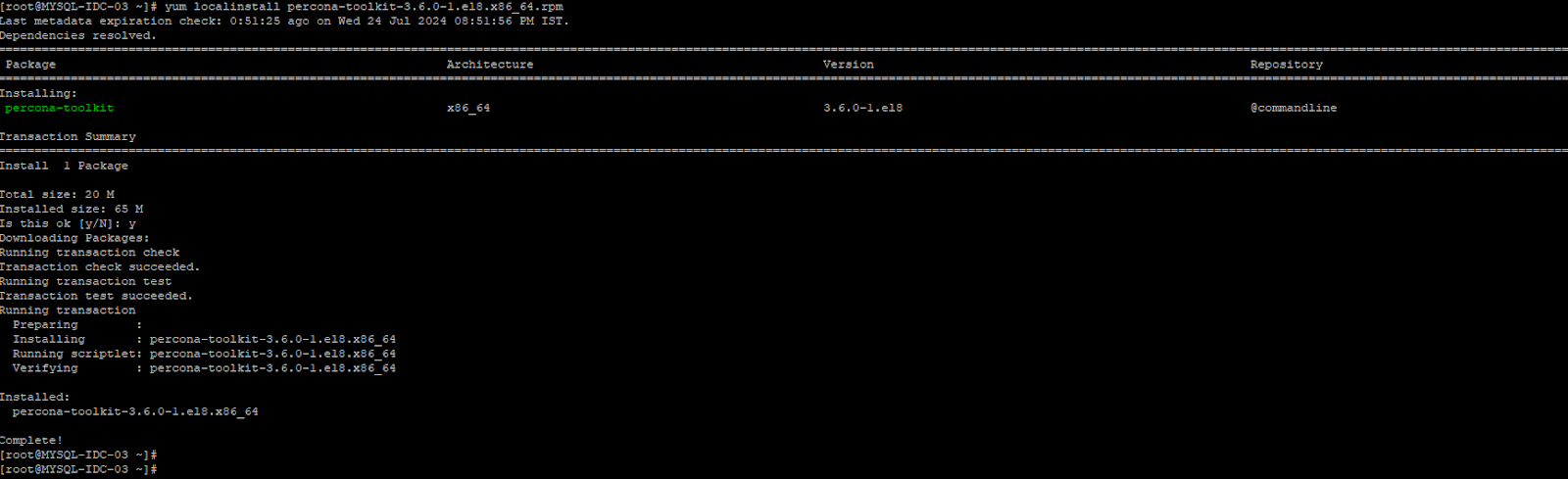
Percona Toolkit:How to alter 1TB data table using Percona Toolkit  In mysql 8.0.37 pt-online-schema-change alters a table’s structure without blocking reads or writes. Specify the database and table in the DSN. Do not use this tool before reading its documentation and checking your backups carefully. Step.1.We need required install and configure  Percona Toolkit. step.2.If you have install sucessfully  Percona Toolkit than pls run   pt-summary command on terminal. step.3.After that we are going to login mysql and create table and insert record. Note:-If you create table without primary key than you can't alter table. suppose that i am creating table without primary key than generate error llok like this step.4.Now we are going to again login mysql and add primary key. step.5.Now finally we are going to run command on terminal. pt-online-schema-change --user='username'--password='password' --execute  --alter "add column emp_salary INT" D=pankaj,t=emp step.5...

How To Install and configure Percona Server 8.0.36 for MySQL on centos 8.5

Image
 How To Install and configure Percona Server 8.0.36 for MySQL on centos 8.5.2. Step.1 Go to Percona Server official website and download rpm package. https://www.percona.com/downloads step.2.We have download successfully rpm package and untar file rpm package. tar -xvf  Percona-Server-8.0.36-28-r47601f19-el8-x86_64-bundle.tar step.3.Install rpm package  and also check rpm list rpm -ivh percona-server-client-8.0.36-28.1.el8.x86_64.rpm percona-server-server-8.0.36-28.1.el8.x86_64.rpm percona-server-shared-8.0.36-28.1.el8.x86_64.rpm percona-server-shared-compat-8.0.36-28.1.el8.x86_64.rpm percona-icu-data-files-8.0.36-28.1.el8.x86_64.rpm step.4. checked mysql service status and start mysql service. step.5.Grep temporary password and run mysql_secure_installation command. step.6.Now we have successfully install and reset root user password. step.7.check version.